Turn Web Addresses into Links
Turn Web Addresses into Links
Spreadsheets, CSV files and database queries hold web addresses as plain text, so a table shows "https://example.com/products/desk-lamp" where a visitor expects something to click. The url2href function turns those addresses into real links, with your own wording if you like.
What url2href does
It looks for addresses starting with http:// or https:// in the cells you choose, and wraps each one in a link. An address in the middle of a sentence is linked where it stands; the rest of the sentence is left alone.
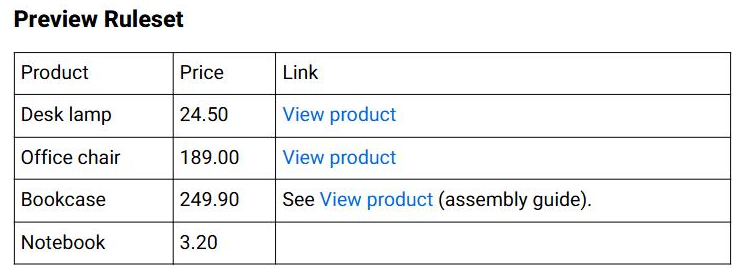
A product list with a Link column, converted with the arguments columns:3;target:_blank;label:View product:
| Product | Price | Link, before | Link, after |
|---|---|---|---|
| Desk lamp | 24.50 | https://example.com/products/desk-lamp | View product |
| Office chair | 189.00 | https://example.com/products/office-chair | View product |
| Bookcase | 249.90 | See https://example.com/bookcase (assembly guide). | See View product (assembly guide). |
| Notebook | 3.20 | (empty) | (empty) |
The header "Link" contains no address, so it is untouched even though column 3 includes row 1. The closing bracket and full stop after the Bookcase address are recognised as punctuation and kept outside the link.
Setting it up
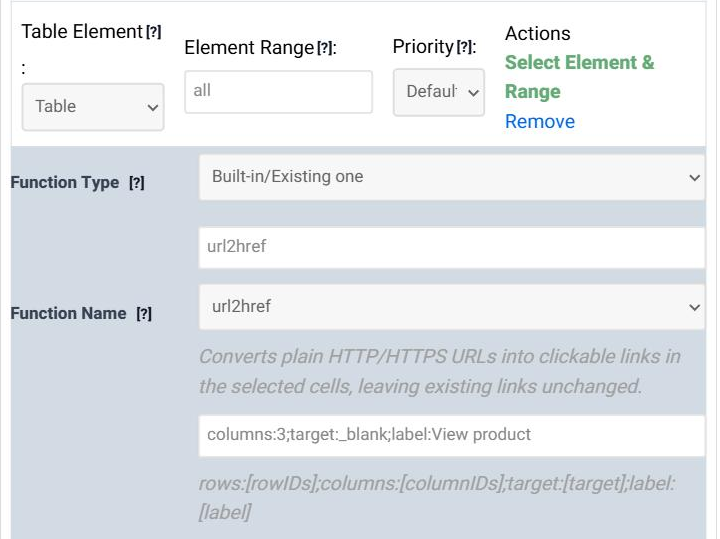
In step 5 (Modifications) of the Table Wizard, click Add new Data Modification, set Function Type to Built-in/Existing one, choose url2href as the Function Name and type the arguments in Function Args. Leave Table Element and Element Range at Table and all.
The arguments
Every argument is optional, and they are written as name:value pairs separated by semicolons, in any order. With no arguments at all, every address in every cell becomes a link showing the address itself.
rows:[rowIDs];columns:[columnIDs];target:[target];label:[label]
| Argument | Meaning | Example |
|---|---|---|
| rows | Only these rows. A comma-separated list counted from 1; L1 is the last row, L2 the one before it. Leave it out for every row. |
rows:2,3,L1 |
| columns | Only these columns, written the same way. Leave it out for every column. | columns:3 or columns:L1 |
| target | Where the link opens. _blank (with the underscore) opens a new tab. Leave it out to open in the same tab. |
target:_blank |
| label | The text shown instead of the address, for every link. Leave it out to show the address itself. | label:View product |
rows and columns take single numbers separated by commas. A range such as 2-5 is not accepted, and an invalid or out-of-range number makes the function leave the whole table unchanged.target:_blank opens a new tab every time; target:blank, without the underscore, opens one tab named "blank" and reuses it.Things to know
Will it break links that are already there?
No. Existing links and other HTML - including addresses inside attributes, and anything in <code> or <pre> - are kept exactly as they are, so running it on cells that are already partly linked is safe.
Which addresses are recognised?
Only those that start with http:// or https://. "www.example.com" on its own, or an e-mail address, is left as text. For addresses that start with "www.", add the protocol with a replacement rule - Find Text ^www\., Replace With https://www. - and give that rule a higher Priority than the url2href rule. Modification functions normally run before replacements; the higher priority makes the replacement run first.
Can each link have its own wording?
Not with label, which is the same for every link. For different wording per row, keep the wording and the address in two columns and join them with a custom function - the AI Assistant can write one for you.
Does the label accept HTML?
No. The label is plain text and is shown exactly as typed, capital letters included. It cannot contain a semicolon, which separates the arguments; colons are fine.
Should I add rel="noopener"?
Modern browsers already treat target="_blank" links as noopener, so links that open in a new tab cannot reach back into your page.
Try it on your own data
Open the Table Wizard, load a table with web addresses in step 1 and add a url2href modification in step 5.