The Form Entries Data Source
The Form Entries Data Source
Turn what visitors have submitted into a table. Pick a form built with the Form Builder, choose the fields that should become columns, put them in order - and the submissions appear as a table you can style, sort, filter and export like any other.
When to use it
Choose Form Entries when the data you want to show is data your own visitors have sent: registrations for an event, entries to a competition, a directory people add themselves to, a log of enquiries for an internal page.
| Good uses | Think twice |
|---|---|
| A public list that people add themselves to - attendees, exhibitors, members of a club. | Anything containing personal details. Those submissions were sent to you, not to the world. |
| An internal page, behind a login, showing the enquiries received this week. | A form whose fields change often - the columns are chosen by field, and a renamed field has to be re-picked. |
| A running total or count that a ruleset can summarise. | Moderation is needed before publication. Nothing here holds a submission back. |
The form
Components › Tabulizer › Data Sources › New Data Source, then set Source Type to Form Entries.
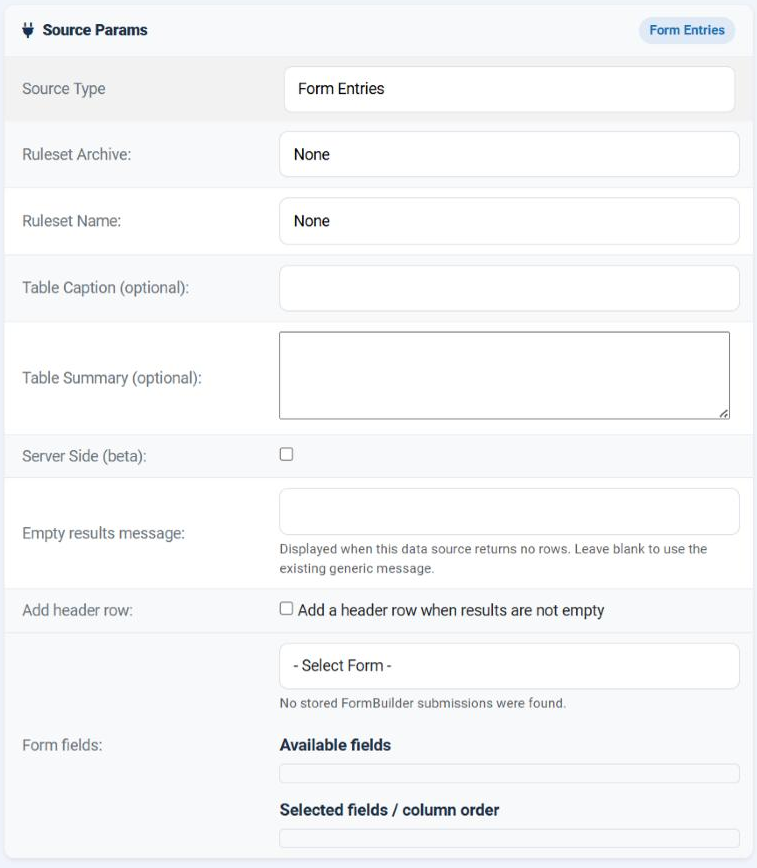
| Field | What it does |
|---|---|
| Form | The dropdown reading - Select Form -. It lists every form that has stored submissions, by title and identifier. Required. |
| Available fields | The fields of the chosen form, once you have chosen one. Labels, headings, submit buttons and CAPTCHAs are left out, since they hold no data. |
| Selected fields / column order | Drag fields here. Each becomes one column, in the order you arrange them. At least one is required. |
| Add header row / Header row | A row of your own labels above the submissions, built exactly as in the database source. |
| Empty results message | What to show before anybody has submitted anything - which, for a new form, is the normal state. |
Choosing the columns
Pick the form
Its fields appear under Available fields.
Drag across only what belongs on the page
This is the privacy decision, and it is the one that matters. A field left in Available is never read.
Arrange them
Drag within Selected fields until the order is the column order you want.
Add headings
Tick Add header row and type one label per selected field, in the same order.
Preview
You will see the real submissions. Check that nothing personal has slipped in.
What the table contains
| Behaviour | Detail |
|---|---|
| One row per submission | In the order they were received, oldest first. |
| One column per selected field | In the order you arranged them. |
| Missing answers become empty cells | A submission made before a field existed, or one that skipped an optional field, still produces a complete row. |
| Multiple answers are joined | A field that accepts several values - a set of tick boxes - arrives as one cell holding all of them. |
| The header row is added only when there are submissions | An empty form produces your empty-results message rather than a table of headings with nothing under it. |
If you want the newest first, or only this month's, that is a job for the ruleset - sort the table on a date column, or filter it. The data source always reads them all, oldest first.
Keeping it current and safe
| Point | What to do |
|---|---|
| New submissions should appear at once | Leave the cache off. Reading submissions is a cheap query on your own database. |
| The list is long and public | Cache it, and turn on Server Side with a paginated ruleset so the browser fetches one page at a time. |
| The page should not be public | Set the Joomla access level on the page - not on the data source. The data source has no idea who is looking. |
| You changed the form | Reopen the data source. A renamed or re-created field is a new field, and has to be dragged across again. |
| You want to see the raw submissions | Components › Tabulizer › Form Submissions lists them, independently of any data source. |
Common questions
The form dropdown is empty.
No submissions have been stored yet. The list is built from what has actually been received - submit the form once and it appears.
My form is missing from the list.
Same reason, or its submissions were deleted. Check Form Submissions.
A field I want is not in Available fields.
Labels, headings, submit buttons and CAPTCHAs are excluded because they carry no answer. Anything else should be there.
It will not save.
Both a form and at least one selected field are required.
Old rows have empty cells in a new column.
Those submissions were made before the field existed. That is expected, and the rows stay aligned.
Can I hide a submission?
Not from here. Delete it in Form Submissions, or filter it out in the ruleset.
How do I show the newest first?
Sort the table in the ruleset. The data source always returns them oldest first.
Build a form entries data source
In your Joomla administrator: Components › Tabulizer › Data Sources › New Data Source.
Back to the Knowledge Base