Table Pagination
Table Pagination
Four hundred rows on one page is a scrollbar nobody uses. Pagination shows ten of them at a time, with arrows to move between pages, a count of what is on screen, and a menu that lets the visitor ask for more.
What pagination does
Pagination breaks the data rows into pages and shows one at a time. The header and footer rows you declare stay on every page: the headings are always above the data, and a totals line is always below it.
The paging happens in the visitor's browser, so moving between pages does not reload the page. All the rows are in the page from the start, which is what lets sorting and filtering work across the whole table rather than across one page of it. For tables big enough that this matters - tens of thousands of rows - use Server Side processing, where one page of rows is fetched at a time.
Switching it on
Tick Table Pagination in the feature list in step 2 (Format), then open Table/Pagination in step 4 (Features). This panel has no Enable tick box: the Pagination Type menu is the switch, and leaving it at None means no pagination.
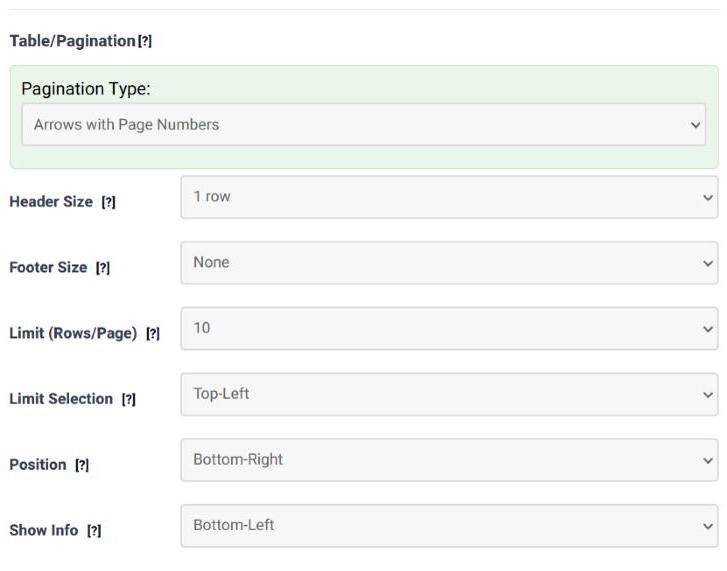
Every field in the panel
| Field | What it does | Options | Default |
|---|---|---|---|
| Pagination Type | The controls the visitor gets, and the switch for the whole feature. Only Arrows gives Previous and Next alone, which suits a narrow table or a phone. Arrows with Page Numbers adds the numbered pages, so a visitor can jump. | None; Only Arrows; Arrows with Page Numbers | None |
| Header Size | How many rows at the top of the table are headers. They are not paged - they repeat above every page. | 1 row … 5 rows | 1 row |
| Footer Size | How many rows at the bottom are footers, shown below every page in the same way. | None, 1 row … 5 rows | None |
| Limit (Rows/Page) | How many data rows a page holds when the table opens. All puts everything on one page, which is useful when you want the controls present but the table short enough not to need them. | 10, 25, 50, 100, 200, All | 10 |
| Limit Selection | Where to put the menu that lets the visitor change the number of rows per page, or None not to offer it at all. | None; Top-Left; Top-Right; Bottom-Left; Bottom-Right | Top-Left |
| Position | Where the page controls themselves sit in relation to the table. | Top-Left; Top-Right; Bottom-Left; Bottom-Right | Bottom-Right |
| Show Info | Where to put the line that says which rows are on screen and how many there are in total ("Showing 1 to 10 of 94 entries"), or None to leave it out. | None; Top-Left; Top-Right; Bottom-Left; Bottom-Right | Bottom-Left |
How it behaves with the other features
| With | What happens |
|---|---|
| Table filtering | The filter runs first and the pages are recounted from what is left. Filtering 400 rows down to 12 leaves two pages of ten, and the count line says so. |
| Column filtering | The same: every filter is applied, then the remainder is paged. |
| Sorting | The sort covers the whole table, not the page on screen, and the pages are rebuilt afterwards. Sorting by price descending really does bring the most expensive row to page 1. |
| Export | The export buttons take all the filtered rows, not only the page being shown. |
| Table split | A split is applied before pagination, so each of the tables it produces is paged on its own. |
Common questions
My header row appears only on the first page.
Header Size is too small, so the second header row is being treated as data and is paged away with it. Set it to the real number of header rows.
Can the visitor choose how many rows to see?
Yes - that is Limit Selection. Give it a position and the menu appears; set it to None and the page size is fixed at whatever Limit (Rows/Page) says.
Which page does the visitor come back to?
The one they were on. The state of each table is remembered, along with the sort and the search term.
The page numbers take up too much room on a phone.
Use Only Arrows. It gives Previous and Next and nothing else, which fits a narrow screen.
Is a huge table slow?
Every row is in the page, so a very large table is slow to load however it is paged. That is what Server Side processing is for: the server sends one page at a time and does the sorting and filtering itself.
Try it on your own data
Open the Table Wizard, tick Table Pagination in step 2 and choose a pagination type in step 4.
Open the Table Wizard