Reshape the full table data by using Modification Functions
Modify Table Rows with Modification Functions
When the built-in rules are not enough, a modification function can do anything PHP can: add calculated columns, reshape rows, look values up in your database, or show each visitor only their own records. It receives the whole table and returns a new version of it.
How a modification function works
The table comes in
Tabulizer reads your data source and hands all rows to the function, with the arguments typed in the rule.
Your code changes it
Add, remove, reorder or rewrite rows, columns and cells.
The rest of the ruleset runs
Modification functions run first, so removals, replacements, formats, styles and features all work on the table your function returns.
Use a built-in function
In step 5 (Modifications) of the Table Wizard, click Add new Data Modification, set Function Type to Built-in/Existing one and choose the Function Name. The wizard shows the function's description and an example of its arguments; type yours in Function Args. Tabulizer comes with these functions:
| Function | What it does | Arguments |
|---|---|---|
addrow |
Adds a row with your values | 2:;:James;18;Los Angeles |
addcolumn |
Adds a column with your values | L1:;:Stock;12;0;7 |
addemptyrow |
Adds an empty row | 2, or L1 for the end |
replaceemptycell |
Fills every empty cell | the text to put in them, for example - |
convertcharset |
Converts every cell to UTF-8 | the encoding of the source, for example ISO-8859-7 |
Tutorial 1 explains addrow and addcolumn in detail. The list shows the functions that describe themselves (see getMeta below); for any other installed function, type its name in the box above the list.
The Table Element and Element Range of a modification rule do not limit what the function sees; it always receives the whole table. They only decide whether it runs, so leave them at Table and all.
Write your own: the example
The rest of this tutorial builds addvat, a function that adds a "Price incl. VAT" column next to a price column. On the product list from Tutorial 1, with the arguments 4:24:Price incl. VAT:
| Product | Colour | Price band | Price | Price incl. VAT | Last order |
|---|---|---|---|---|---|
| Desk lamp | blue | affordable | 24.50 | 30.38 | 2026-09-02 |
| Office chair | black | expensive | 189.00 | 234.36 | 2026-08-28 |
| Bookcase | white | expensive | 249.90 | 309.88 | 2026-09-10 |
Here is the complete file. Save it as templates/tabulizer/modify/addvat.php on a Joomla site, or wp-content/plugins/tabulizer/templates/tabulizer/modify/addvat.php on WordPress.
<?php
// no direct access
defined('_JEXEC') or die('Restricted access');

/**
 * Adds a "price including VAT" column next to a price column.
 * Args: [priceColumn]:[vatPercent]:[header], e.g. 4:24:Price incl. VAT
 */
class TabulizerModifyAddvat extends TabulizerModify {

    public function modify(&$rows, $args = null) {
        if (empty($rows)) return;

        // 1. read the arguments
        $parts = explode(':', (string) $args, 3);
        $price_column = (int) $parts[0];
        $vat = (isset($parts[1]) && is_numeric($parts[1])) ? (float) $parts[1] : 24;
        $header = (isset($parts[2]) && $parts[2] !== '')
            ? $parts[2] : $this->text('PRICE_INCL_VAT');

        $num_of_columns = count($rows[1]);
        if (($price_column < 1) || ($price_column > $num_of_columns)) return;

        // 2. build the new table, row by row
        $modified_rows = array();
        foreach ($rows as $row_id => $row) {
            $new_row = array();
            $j = 1;
            foreach ($row as $column_id => $cell) {
                $new_row[$j++] = $cell;
                if ($column_id == $price_column) {
                    if ($row_id == 1) {
                        $new_row[$j++] = $header;               // the header row
                    } else {
                        $price = TabulizerMath::getNumericValue(trim($cell));
                        $new_row[$j++] = is_numeric($price)
                            ? number_format($price * (1 + $vat / 100), 2, '.', '')
                            : '';
                    }
                }
            }
            $modified_rows[$row_id] = $new_row;
        }

        // 3. hand the new table back
        $rows = $modified_rows;
    }

    public function getMeta() {
        return array(
            'func_name' => 'addvat',
            'func_desc' => 'Adds a column with the price including VAT, '
                         . 'right after the price column.',
            'arg_desc'  => '[priceColumn]:[vatPercent]:[header]<br/><br/>'
                         . 'Example: <pre>4:24:Price incl. VAT</pre>',
        );
    }
}
?>
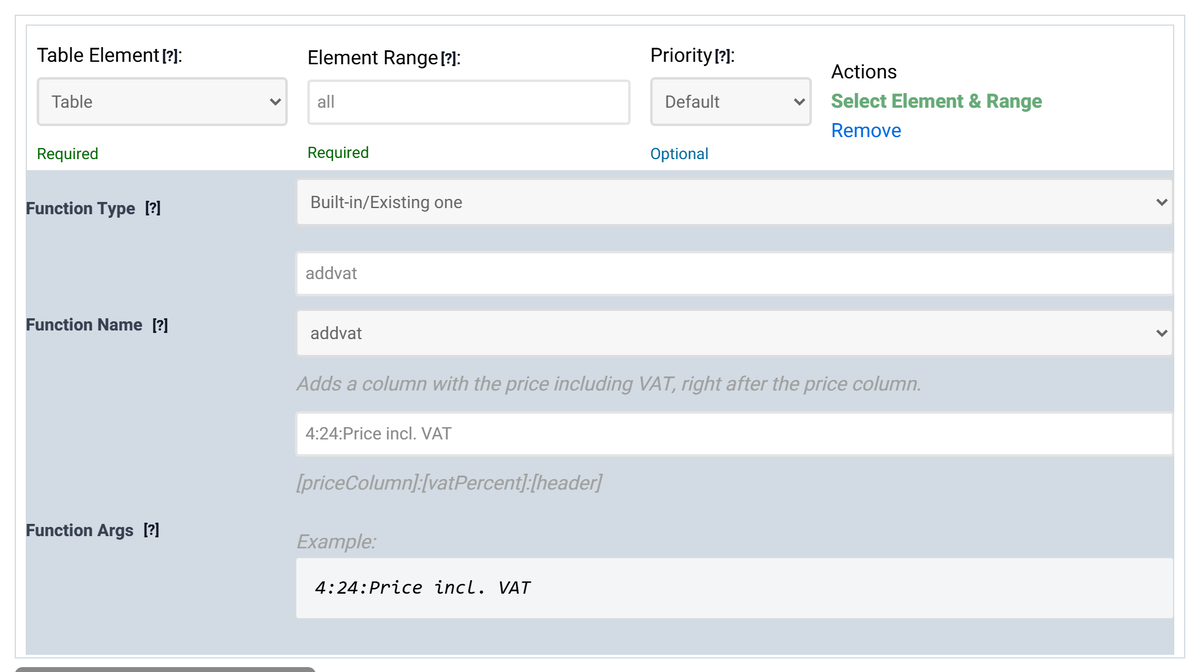
Once the file is in place, addvat appears in the wizard's Function Name list with its description and example:
The naming convention
Tabulizer finds a function by its name alone, so the file and the class must follow one rule:
| Rule | For "addvat" | |
|---|---|---|
| Function name | Letters, digits and underscores. Tabulizer lowercases it. | addvat |
| File | templates/tabulizer/modify/ + the name in lower case + .php |
addvat.php |
| Class | TabulizerModify + the name with its first letter in upper case, the rest in lower case, and underscores removed |
TabulizerModifyAddvat |
price_list lives in price_list.php, but its class must be TabulizerModifyPricelist. With the wrong class name, Tabulizer skips the function without an error and the table is shown unchanged.The modify() method
public function modify(&$rows, $args = null)
This is the one method you must write. Tabulizer calls it once per table.
$rows: the table
- A two-dimensional array:
$rows[$row][$column]. Both are numbered from 1, so$rows[1][1]is the top-left cell and row 1 is usually the header. - Every cell is a string, and it may contain HTML.
- It is passed by reference (
&$rows). Change it in place or assign a new array to it; the return value ofmodify()is ignored. - If you build a new array, number its rows and columns from 1 without gaps, and give every row the same number of columns. Other rules rely on that.
$args: the arguments
Everything typed into Function Args, as one string, or an empty string when nothing was typed. Split it yourself, as addvat does with explode(':', $args, 3). Check every part and simply return when something is wrong: the table is then shown unchanged instead of broken.
What your class inherits from TabulizerModify
Extending TabulizerModify is optional; a plain class with a modify() method also works. Extend it anyway: you get these helpers, and only subclasses can appear in the wizard's list.
| Member | What it gives you |
|---|---|
$this->name |
The function's name, for example "addvat". |
$this->text($key) |
A translated string from the function's own language file, or $key itself when there is none. See below. |
$this->param($key) |
Information about the visitor and the site, or false: {user_id}, {user_name}, {user_email}, {user_fullname}, {user_groupids}, {user_register_date}, {user_lastvisit_date}, {site_lang} and {current_datetime} (the braces are part of the key). |
$this->getCMSVersion() |
An array with the platform under the key 'csm' and its version under 'version'. |
$this->dbGetQueryObjectList($query) |
Runs a query on the site's database and returns the rows as objects. |
$this->dbGetQueryObject($query) |
Returns the first row as an object. |
$this->dbGetQueryResult($query) |
Returns a single value. |
$this->dbExecuteQuery($query, $error_msg) |
Runs a query that returns no rows; $error_msg receives any error. |
Tabulizer prepares these before calling modify(); you never call the base class's init() yourself. Tabulizer's own helpers are available too, for example TabulizerMath::getNumericValue(), which reads "1,234.5" and "1.234,5" as the same number.
Example: each visitor sees only their own rows
public function modify(&$rows, $args = null) {
    $column = (int) $args;                      // the column that holds the username
    $user = $this->param('{user_name}');
    if (empty($rows) || $column < 1) return;

    $modified_rows = array(1 => $rows[1]);     // keep the header
    $i = 2;
    foreach ($rows as $row_id => $row) {
        if ($row_id > 1 && !empty($user) && isset($row[$column]) && $row[$column] === $user) {
            $modified_rows[$i++] = $row;
        }
    }
    $rows = $modified_rows;
}
getMeta(): appear in the wizard's list
The Function Name list in the Table Wizard shows the functions that extend TabulizerModify and have a public getMeta() method. It returns three texts:
func_name: the name shown in the list.func_desc: one sentence under the list.arg_desc: the argument format and an example, shown under Function Args. HTML is allowed.
Language files
Text your function shows to visitors can be translated. Put the strings in templates/tabulizer/language/, in a file named after the function and the language:
addvat.en.ini      PRICE_INCL_VAT="Price incl. VAT"
addvat.el.ini      PRICE_INCL_VAT="Τιμή με ΦΠΑ"
The English file is loaded first, then the file for the site's language on top of it. In the function, $this->text('PRICE_INCL_VAT') returns the right one.
Write the function in the wizard
Instead of uploading a file, you can write the code in the Table Wizard. Set Function Type to New/Custom, type the Function Name and click Add Skeleton Code: the wizard fills in a working class with the right name, ready for your changes.
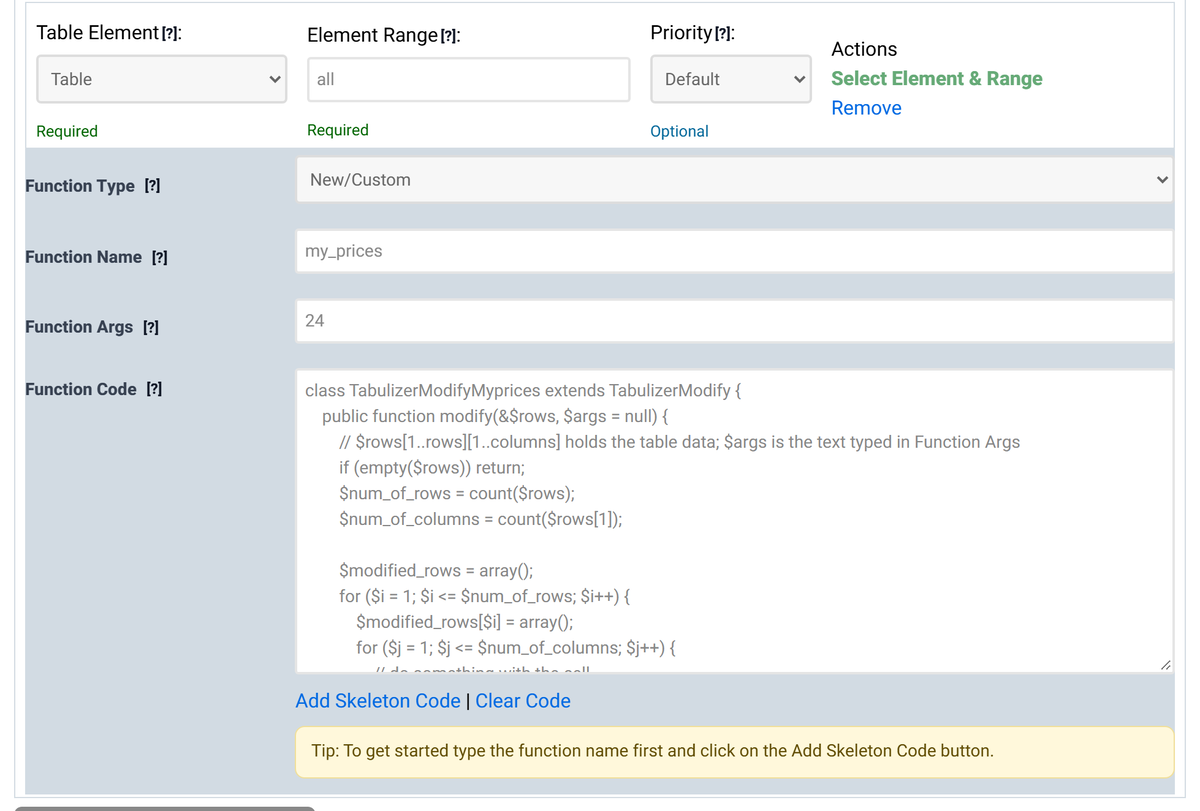
- For your site's safety, custom code does not run in the wizard's preview; the preview shows a note instead.
- You need to be logged in. When you save the ruleset, the code is saved with it as a file, and it is included in the ruleset archive you download. Installing that archive on your site puts the function in place.
- After that the function is an installed function like any other, and you can reuse it in other rulesets.
Checklist
The table did not change
Check the file name and the class name first; underscores in particular. Then check that modify() assigns the new array to $rows, and that the arguments you typed pass your own checks.
Other rules now hit the wrong column
Your function runs first, so every other rule sees its result. If it adds a column before column 4, the old column 4 is now column 5 for the rules that follow.
Can I show messages?
Do not echo anything; the output would end up in the middle of the page. Return early and leave the table unchanged instead.
Build your own
Start from the skeleton code in the Table Wizard, or copy addvat and change it.