The Chained Data Source
The Chained Data Source
Two rulesets, one after the other. Reshape the data with a table wizard ruleset, then hand the result to a chart, gallery or calendar ruleset - without touching the original data and without a second copy of it anywhere.
What it does
A Chained Data Source has no file, no query and no feed of its own. Its data is one other data source - read complete, with that data source's own ruleset already applied - which it then passes to its own ruleset.
That second sentence is the whole point. A data source is not just rows: it is rows plus a ruleset. When a chained data source reads one, it gets what came out of the ruleset, not what went in.
Why you would want one
The table wizard has data modifications: adding columns, removing them, reordering, replacing values, merging cells, formatting numbers. The other wizards do not. A chart ruleset draws what it is handed; a gallery ruleset lays out what it is handed. Neither reshapes anything first.
So when the incoming data is not in the shape the chart needs, there is nowhere in the chart wizard to fix it. The usual workarounds are all bad: edit the source spreadsheet by hand, keep a second copy of the data in the right shape, or write a database view purely to feed one chart.
A chain removes the problem. Two data sources, one reading the other:
| Step | Data source | Its ruleset | What it contributes |
|---|---|---|---|
| 1 | The ordinary one - a spreadsheet, a query, a feed | A table wizard ruleset | The data modifications: the columns the chart needs, in the order it needs them, with the values it can read. |
| 2 | A Chained Data Source pointing at step 1 | The chart (or gallery, calendar, timeline) ruleset | The rendering. |
The original data is never touched, and when it changes both steps follow automatically.
The form
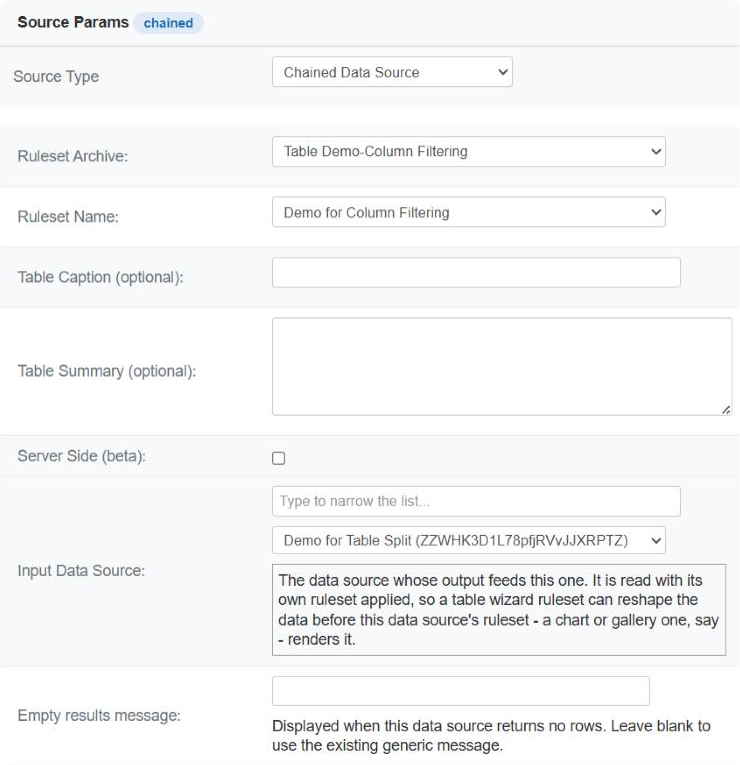
Components › Tabulizer › Data Sources › New Data Source, then set Source Type to Chained Data Source. The common fields are the usual ones; in place of a file or a query there is a single field.
| Field | What to put in it |
|---|---|
| Input Data Source | The data source whose output this one reads. The list holds every other data source on the site, each shown as its title with its tag in brackets. The box above it narrows the list as you type - useful once a site has more than a handful - and matches on the title or the tag. |
| Ruleset Archive and Ruleset Name | The ruleset applied to the data that arrives: the chart, gallery, calendar or timeline one. Both are required, as for every data source. |
| Table Caption, Table Summary | Optional, and as for any other type. |
| Server Side | Available, but think before using it on a chain - see below. |
| Empty results message | Shown when the chain produces no rows. Worth setting, because a chain has two places that can quietly come back empty. |
The data source being edited never appears in its own list, so a chain cannot be pointed at itself by accident.
Building a chain
Build the input first, and preview it
Create the ordinary data source - the spreadsheet, the query, the feed - give it a table wizard ruleset with the modifications you need, and preview it until the table is exactly the shape you want the chart to receive. A chain built on an unchecked input is two problems at once.
Create the chained data source
New Data Source, Source Type Chained Data Source, and pick the first one as the Input Data Source.
Give it the ruleset that renders
The chart or gallery ruleset goes here, not on the input.
Preview
What you see is the input's transformed data drawn by this ruleset. If the chart is wrong, preview the input on its own to find out which of the two steps to fix.
Use the chained one on the page
Insert the chained data source, not the input. The input is scaffolding; it does not have to appear anywhere itself.
Longer chains
A chained data source may read another chained data source, as deep as the job needs - reshape, reshape again, then render. Each link applies its own ruleset to what the previous one produced. Keep chains short all the same: every link is another ruleset to run and another thing to check when the result looks wrong.
Things worth knowing
| Behaviour | What it means for you |
|---|---|
| The input's ruleset is applied | This is the difference between a chain and a plain copy. The rows that arrive have been through the input's data modifications. |
| Only rows travel | The styling of the input - its colours, borders, themes - is not carried over. The chained data source's own ruleset styles what is rendered. That is what makes a table ruleset a sensible thing to put on the input. |
| A splitting ruleset yields several tables | If the input's ruleset splits its table, the chain carries on with the first of the resulting tables. Splitting an input you intend to chain from is rarely what you want. |
| Each link caches separately | Both the input and the chained data source have their own cache setting. Cache the input and the expensive part - the query or the remote file - happens once for everything downstream. |
| A loop is refused, not run | A data source cannot read its own output, directly or through other links. A direct self-reference is refused when you save; a longer loop is detected while rendering and reported rather than hanging the page. |
| An empty input gives an empty chain | If the input produces no rows, so does the chain, and the message names the input's tag so you know which link failed. |
Common questions
The list is empty.
There is no other data source yet. A chain needs something to read, so create the input first.
Why not just put the chart ruleset on the original data source?
You can, and when the data already has the right shape that is the simpler answer. The chain is for when it does not, because the chart wizard has no data modifications of its own.
My chart still gets the wrong columns.
Preview the input on its own. What you see there is exactly what the chain receives. If the columns are wrong in the input's preview, fix the input's table wizard ruleset; if they are right there and wrong in the chart, the problem is in the chart ruleset.
Can the input be used on its own as well?
Yes. It stays an ordinary data source and can be inserted into any page in its own right. Nothing about being chained from changes it.
I changed the input and the chart did not change.
Caching, in one link or the other. Clear the cache on both, or set the input's cache time to suit how often the data really changes.
Can I point two charts at the same transformed data?
Yes, and this is where chains pay off most. One input with the table wizard ruleset, then as many chained data sources as you like - a bar chart, a pie chart, a gallery - each with its own rendering ruleset, all reading the same transformed rows.
What happens if I delete the input?
The chain has nothing to read and reports that the input returned no rows, naming its tag. Nothing else breaks, but the chained data source will not render until you point it somewhere else.
Is there a limit to how long a chain can be?
No fixed one, but each link costs a ruleset run on every uncached view. Two links cover almost every real case; if you find yourself needing four, it is usually a sign that the input's ruleset should be doing more of the work.
Build a chain
In your Joomla administrator: Components › Tabulizer › Data Sources › New Data Source.
Back to the Knowledge Base