Remove table rows or columns based on user criteria
Tabulizer 4.1 bring an existing new feature that allows you to remove specific rows and columns based on user criteria, such as:
- Remove all rows that in the 1st column contain a date less than a given date threshold.
- Remove all rows that in the 4th column contain a given text.
- Remove all rows that in 1,2,5 columns have a numeric value less than 0.
Let's look at the example below.
Initial table| 1972 | XX | West Germany Munich, West Germany | Summer |
| 1972 | XI | Japan Sapporo, Japan | Winter |
| 1976 | XXI | Canada Montreal, Canada | Summer |
| 1976 | XII | United States Denver, United States | Winter |
| 1980 | XXII | Soviet Union Moscow, Soviet Union | Summer |
| 1988 | XIII | United States Lake Placid, United States | Winter |
| 1984 | XXIII | United States Los Angeles, United States | Summer |
| 1988 | XIV | Socialist Federal Republic of Yugoslavia Sarajevo, Yugoslavia | Winter |
| 1988 | XXIV | South Korea Seoul, South Korea | Summer |
| 1988 | XV | Canada Calgary, Canada | Winter |
| 1992 | XXV | Spain Barcelona, Spain | Summer |
| 1994 | XVII | Norway Lillehammer, Norway | Winter |
| 1996 | XXVI | United States Atlanta, United States | Summer |
| 1998 | XVIII | Japan Nagano, Japan | Winter |
| 2000 | XXVII | Australia Sydney, Australia | Summer |
| 2002 | XIX | United States Salt Lake City, United States | Winter |
| 2004 | XXVIII | Greece Athens, Greece | Summer |
The table data for initial table are contained in an Excel file that keeps a list of all Olympics games. Suppose now that we want to display only the most recent games, e.g. the games that took place the last 20 years.
Instead of changing the sheet selection or modyfing our input source, we could add instead a new rule that will delete all rows that contain dates that are 21 years or older from the current date.
These are the rule settings we can use:

This is table after applying the ruleset that contains a rule to remove all rows with dates older than -21 years from now.
| 1972 | XI | Japan Sapporo, Japan | Winter |
| 1976 | XXI | Canada Montreal, Canada | Summer |
| 1976 | XII | United States Denver, United States | Winter |
| 1980 | XXII | Soviet Union Moscow, Soviet Union | Summer |
| 1988 | XIII | United States Lake Placid, United States | Winter |
| 1984 | XXIII | United States Los Angeles, United States | Summer |
| 1988 | XIV | Socialist Federal Republic of Yugoslavia Sarajevo, Yugoslavia | Winter |
| 1988 | XXIV | South Korea Seoul, South Korea | Summer |
| 1988 | XV | Canada Calgary, Canada | Winter |
| 1992 | XXV | Spain Barcelona, Spain | Summer |
Another possibility is to remove all rows that contain a certain text. In the next example we will remove all rows that contain a cell with value equal to Winter, because we want to display only summer games. The summer/winter text is in the 4th column, so we can be more specific just in case we accidentally delete a row that contains the text "Winter" on another column.
These are the rule settings we can use:
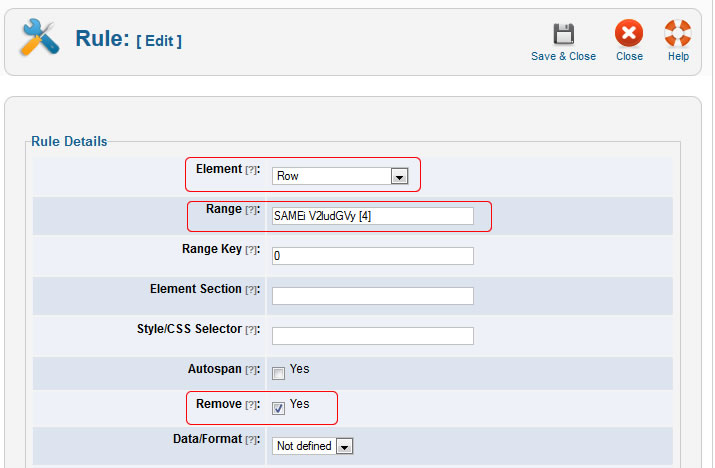
This is table after applying the ruleset that contains a rule to remove all rows that in the 4th column contain the text value "Winter".
| 1972 | XX | West Germany Munich, West Germany | Summer |
| 1976 | XXI | Canada Montreal, Canada | Summer |
| 1980 | XXII | Soviet Union Moscow, Soviet Union | Summer |
| 1984 | XXIII | United States Los Angeles, United States | Summer |
| 1988 | XXIV | South Korea Seoul, South Korea | Summer |
| 1992 | XXV | Spain Barcelona, Spain | Summer |
| 1996 | XXVI | United States Atlanta, United States | Summer |
| 2000 | XXVII | Australia Sydney, Australia | Summer |
| 2004 | XXVIII | Greece Athens, Greece | Summer |