How to Change the Error Reporting Settings
How to Change the Error Reporting Settings
You may sometimes see "deprecated" notices when using Tabulizer for Joomla. They are not actual errors, but notes meant for developers. You can switch them off with one setting in Joomla - and please tell us about them, so we can deal with their source.
What these notices are
A notice such as this one is PHP saying that some code uses a feature which a future PHP version will drop:
Deprecated: strlen(): Passing null to parameter #1 ($string) of type string is deprecated in ...
The page and your tables keep working. The notices typically appear after your host moves the site to a newer PHP version, and only because the site is set to display them.
Change the setting
Open Global Configuration
In your Joomla administrator go to System › Global Configuration.
Open the Server tab
Find Error Reporting in the Server section.
Choose None
Press Save, then reload the page that showed the notices.
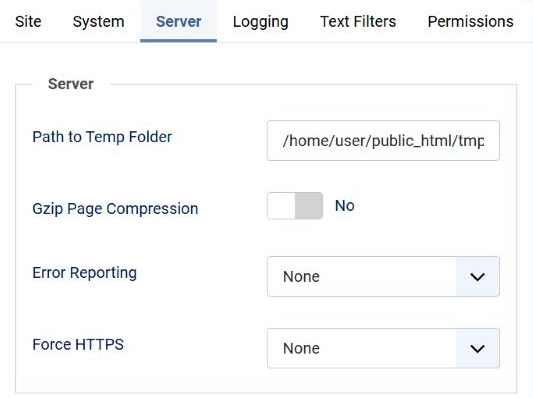
| Value | What is shown | When to use it |
|---|---|---|
| System Default | Whatever your server's PHP settings say, which may include these notices. | When your host's settings are already suited to a live site. |
| None | Nothing. | Live (production) sites. Recommended. |
| Simple | Errors and warnings. | Looking for a problem. |
| Maximum | Everything, including deprecated notices. | Development and test sites, or briefly while diagnosing a blank page. |
On Joomla 3 the setting is in the same place, and the list also offers Development; choose None there too.
If you cannot get into the administrator
The same setting is kept in the file configuration.php, in the root folder of your site. Open it with your host's file manager and change this line:
public $error_reporting = 'none';
configuration.php before editing it. A missing quote or semicolon in this file stops the whole site.Report the notice to us
Turning the display off hides the notice; it does not remove its cause. Before you switch it off, copy it and send it through the Help Desk with:
| Send | Where to find it |
|---|---|
| The full text of the notice, including the file name and line number | The page that shows it |
| Tabulizer version, Joomla version and PHP version | Components › Tabulizer › Status - see the Status page |
| What you were doing when it appeared | The page address, or the back-end screen |
It is also worth checking that you run the latest Tabulizer release; the notice may already be fixed.
Common questions
Is my site broken?
Not because of a deprecated notice. If something also fails to work, tell us what.
The notice names a file that is not part of Tabulizer.
Then it comes from Joomla, your template or another extension. Report it to its developer.
I set it to None and still see notices.
Clear the Joomla cache and any caching service in front of your site. If they remain, some extension or the server forces them to show; ask your host.
Found a notice from Tabulizer?
Send us its full text through the Help Desk.
Back to Joomla Guides