Numeric Precision in Microsoft Excel: Issues and How to Resolve Them
Numeric Precision in Microsoft Excel: Issues and How to Resolve Them
A cell that reads 1.3 in Excel appears in your table as 1.299999999999999. Nothing is wrong with your data: it is the way spreadsheets store numbers, and one modification rule in the ruleset puts it right.
Why it happens
Microsoft Excel, like other spreadsheet programs, keeps numbers in binary with limited accuracy, about 15 significant digits. Many decimal numbers have no exact binary form, so the stored value is very close to what you typed but not identical - especially when it is the result of a formula. Excel hides this by rounding what it shows on screen.
When Tabulizer reads the file, it can receive the stored value rather than the rounded one, and the long row of decimals becomes visible in the table:
| Excel shows | The table shows |
|---|---|
| 1.3 | 1.299999999999999 |
| 0.7 | 0.7000000000000001 |
| 12.95 | 12.949999999999999 |
ROUND, for example =ROUND(B2*C2, 2). When the file is not yours, or is replaced often, do the rounding in the ruleset instead.Step 1: add the math_round function
math_round is a small modification function that rounds only the numbers that have more decimal digits than you ask for. Text, whole numbers and shorter decimals stay exactly as they are. In step 5 (Modifications) of the online Table Wizard:
Add a rule
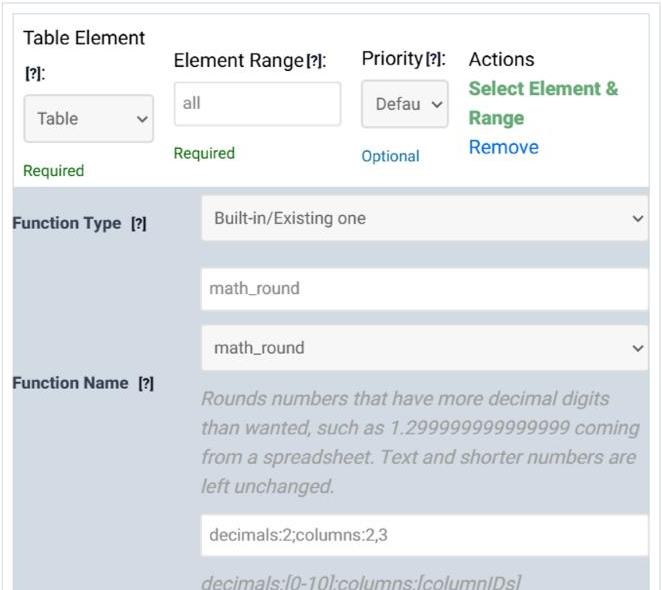
Press Add new Data Modification, set Table Element to Table and Element Range to all.
Write the function
Set Function Type to New/Custom, type math_round as the Function Name and paste the code below into the code box.
Give the arguments
In Function Args type, for example, decimals:2;columns:2,3.
<?php
// no direct access
defined('_JEXEC') or die('Restricted access');

/**
 * Rounds numbers that carry more decimals than wanted, e.g. 1.299999999999999 -> 1.3
 * Args (all optional): decimals:2;columns:2,L1
 */
class TabulizerModifyMathround extends TabulizerModify {
    public function modify(&$rows, $args = null) {
        if (empty($rows)) return;

        $decimals = 2;
        $column_ids = null;
        foreach (explode(';', (string) $args) as $part) {
            if (trim($part) === '') continue;
            $pair = array_map('trim', explode(':', $part, 2));
            if (count($pair) !== 2) return;
            $key = strtolower($pair[0]);
            if ($key === 'decimals' && preg_match('/^([0-9]|10)$/', $pair[1])) {
                $decimals = (int) $pair[1];
            } else if ($key === 'columns') {
                $column_ids = $this->getIds($pair[1], count(reset($rows)));
                if ($column_ids === false) return;
            } else {
                return;
            }
        }

        foreach ($rows as $row_id => $row) {
            foreach ($row as $column_id => $cell) {
                if ($column_ids !== null && !isset($column_ids[$column_id])) continue;
                $rows[$row_id][$column_id] = $this->roundCell((string) $cell, $decimals);
            }
        }
    }

    /** Returns a lookup of column ids, or false for an invalid list. */
    private function getIds($list, $count) {
        $ids = array();
        foreach (explode(',', $list) as $value) {
            $value = strtolower(trim($value));
            if (preg_match('/^l([1-9][0-9]*)$/', $value, $matches)) {
                $id = $count + 1 - (int) $matches[1];
            } else if (preg_match('/^[1-9][0-9]*$/', $value)) {
                $id = (int) $value;
            } else {
                return false;
            }
            if ($id < 1 || $id > $count) return false;
            $ids[$id] = true;
        }
        return $ids;
    }

    /** Rounds the text of a cell, leaving any markup around it (Excel styling) as it is. */
    private function roundCell($cell, $decimals) {
        $parts = preg_split('/(<[^>]*>)/', $cell, -1, PREG_SPLIT_DELIM_CAPTURE);
        if ($parts === false) return $cell;
        foreach ($parts as $i => $text) {
            // odd positions are the tags themselves
            if ($i % 2 === 0) $parts[$i] = $this->roundText($text, $decimals);
        }
        return implode('', $parts);
    }

    private function roundText($text, $decimals) {
        // only a text that is a plain number: -12.3456 or 1.2E-16, optionally followed by %
        if (!preg_match('/^(\s*)(-?[0-9]+(?:\.([0-9]+))?(?:[eE]([-+]?[0-9]+))?)(\s*%?\s*)$/', $text, $m)) {
            return $text;
        }
        $places = strlen($m[3]) - (int) $m[4];
        if ($places <= $decimals) return $text; // nothing to round

        $number = number_format((float) $m[2], $decimals, '.', '');
        if (strpos($number, '.') !== false) $number = rtrim(rtrim($number, '0'), '.');
        if ($number === '-0') $number = '0';

        return $m[1] . $number . $m[5];
    }

    public function getMeta() {
        return array(
            'func_name' => 'math_round',
            'func_desc' => 'Rounds numbers that have more decimal digits than wanted, such as 1.299999999999999 coming from a spreadsheet. Text and shorter numbers are left unchanged.',
            'arg_desc' => 'decimals:[0-10];columns:[columnIDs]<br/><br/>'
                . 'Both arguments are optional and separated by a semicolon. Without <strong>decimals</strong>, numbers are rounded to 2 decimal digits. '
                . 'Without <strong>columns</strong>, every column is checked. Column IDs are comma separated and start at 1; use <strong>L1</strong> for the last column.<br/><br/>'
                . 'Example: <pre>decimals:2;columns:2,L1</pre>'
                . 'Trailing zeros are not added (1.299999999999999 becomes 1.3). Invalid arguments leave the table unchanged.',
        );
    }
}
You need to be logged in to save a ruleset with your own code. For safety, custom code does not run in the wizard's preview; the preview shows a note instead.
Step 2: set the arguments
| Argument | Meaning | If omitted |
|---|---|---|
decimals:2 |
The largest number of decimal digits to keep, from 0 to 10. | 2 |
columns:2,L1 |
The columns to round, counted from 1; L1 is the last one. |
Every column |
Name the columns when the table also holds numbers that need all their digits, such as coordinates or exchange rates. This is how the rule looks once the function is installed and chosen from the list:
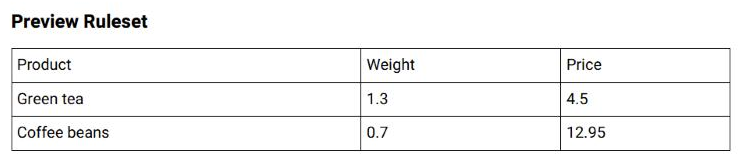
With that rule, the columns Weight and Price come out clean:
Step 3: use it on your site
Save the ruleset, download its archive and import it into your site. The function is part of the archive, so importing it installs the function too. Point your Excel data source at the ruleset, and press Clear Cache if the data source caches.
Once installed, math_round is available to your other rulesets: choose Built-in/Existing one as the Function Type and select it from the list, or type its name.
math_round.php in templates/tabulizer/modify/ on Joomla, or in wp-content/uploads/tabulizer/modify/ on WordPress.Common questions
I want two decimals always, as in 4.50.
math_round removes excess digits and adds no zeros. For a fixed appearance add a number format rule as well - see Adjust Data Formats. Modifications run before formats.
Nothing is rounded.
Check the arguments: when they are invalid, or name a column the table does not have, the function leaves the table unchanged. Also clear the data source cache.
My numbers use a comma as the decimal separator.
The function rounds numbers as Excel stores them, with a point. Text such as 1,299999999 typed into a CSV file is left as it is.
Are prices written with a currency symbol rounded?
No. Only a cell holding a plain number, optionally followed by %, is rounded.
Read more
How modification functions work: Reshape the Full Table Data by Using Modification Functions.
Need a hand?
Ask the AI Assistant, or send us a sample of your file through the Help Desk.
Back to Troubleshooting