I See a "DataTables warning" When My Table Is Displayed
I See a "DataTables warning" When My Table Is Displayed
Tables with sorting, pagination or filtering are run by a library called DataTables. When something it expects is missing or has an invalid value, it says so in a pop-up. The message tells you which table is affected and what kind of problem it has.
Reading the message
A typical warning looks like this:
DataTables warning: table id=tab_vtG12h2kDp - Requested unknown parameter '5' for row 0,
column 5. For more information about this error, please see https://datatables.net/tn/4
| Part | What it tells you |
|---|---|
table id=tab_vtG12h2kDp |
Which table on the page has the problem. Useful when a page holds more than one. |
row 0, column 5 |
Where DataTables looked and found nothing. It counts from 0, so column 5 is the sixth column. |
datatables.net/tn/4 |
The kind of problem. The number at the end identifies it, and the page behind the link describes it. |
Cause 1: the ruleset refers to a column the table does not have
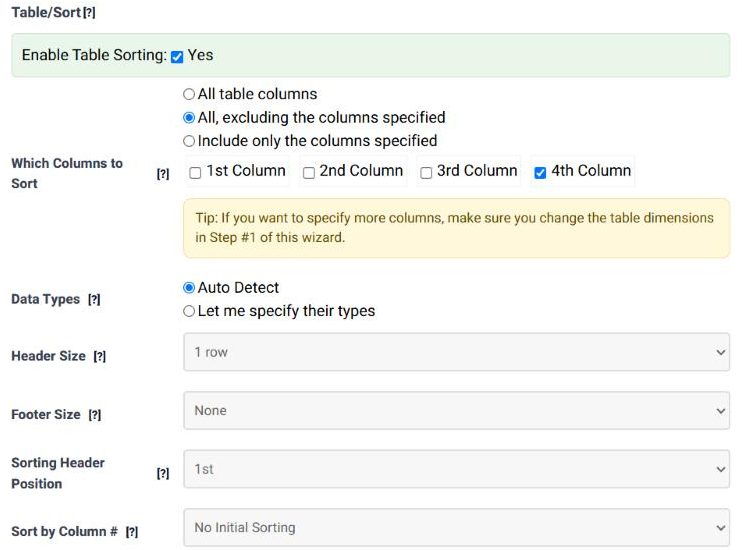
This is the most common case. The ruleset was designed in the Table Wizard with more columns than the data it is now used with. For example, you chose to sort all columns except the 6th, but the table on your site has only 4 columns.
The wizard offers as many per-column choices as the number of columns you set in step 1, so a mismatch arises when the sample data there is wider than your real data.
Fix it
Match the dimensions
Open the ruleset in the Table Wizard. In step 1 set the number of columns to that of your real data, and use sample data with the same columns.
Check every column reference
In step 4: Which Columns to Sort, Data Types, Sort by Column # and Column Filters. Also any other setting where you picked a column by number.
Check the header and footer rows
Header Size and Footer Size must not count rows the table does not have.
Update the ruleset on your site
Import it again, choosing to overwrite the existing files. If a data source with the cache turned on uses it, press Clear Cache too.
Cause 2: the rows do not all have the same number of cells
Every body row needs one cell for every column. The same tn/4 warning appears when:
| Situation | What to do |
|---|---|
| Cells are merged in the body of the table | Unmerge them. Merged cells and dynamic features do not mix; if you need the merged layout, use a ruleset without sorting, filtering and pagination. |
| Some rows are shorter than the header row | Add the missing cells, if only empty ones. In a data source, check the Column Consistency setting where it is offered. |
| A message row spans the whole width | Move the note outside the table, for example into its caption. |
Cause 3: the table is set up twice
A different message - Cannot reinitialise DataTable, ending in tn/3 - means two scripts are working on the same table. Usually your template or another extension applies its own table script to every table on the page. Turn that feature off in the template or extension, or limit it so that it leaves Tabulizer tables alone.
Common questions
The preview in the wizard is fine, the page on my site is not.
The wizard previews your sample data. Compare its number of columns and rows with the data the table really receives.
The warning started after I changed my spreadsheet.
A column was probably removed, or a row was left with merged cells. Adjust the data, or adjust the ruleset to the new layout.
The data has changing columns.
Refer only to columns that are always there, or use a ruleset without column-specific settings.
Is my data damaged?
No. The warning concerns how the table is displayed; your file or database is not changed.
Read more
Table Sorting and Table Pagination describe the settings mentioned here.
Still see the warning?
Send us the exact text of the message and the address of the page through the Help Desk.
Back to Troubleshooting