Pagination
A ruleset that shows the table one page at a time.
A table with thousands of rows can keep the browser busy for a long time, and sometimes the page simply stays blank. Tabulizer can display very large tables comfortably: three settings make it send only the rows the visitor is looking at.
Normally the whole table is sent to the browser, which has to draw every row before the visitor can use it. Pagination on its own hides most of the rows, but they are all still downloaded. On the server side, reading a big file and applying the ruleset to it takes memory and time on every visit - and when PHP runs out of either, the result is often a blank page.
The solution is to combine these three:
A ruleset that shows the table one page at a time.
A data source that sends the browser only the rows of the current page.
The processed rows are stored, so the file or query is not read again on every visit.
With all three, the time a page takes to appear no longer depends much on how many rows the table has.
In the online Table Wizard, go to step 4 (Features) and find Table/Pagination. Choose a Pagination Type other than None, and set Limit (Rows/Page) to the number of rows a visitor should see at once. Then import the ruleset into your site.
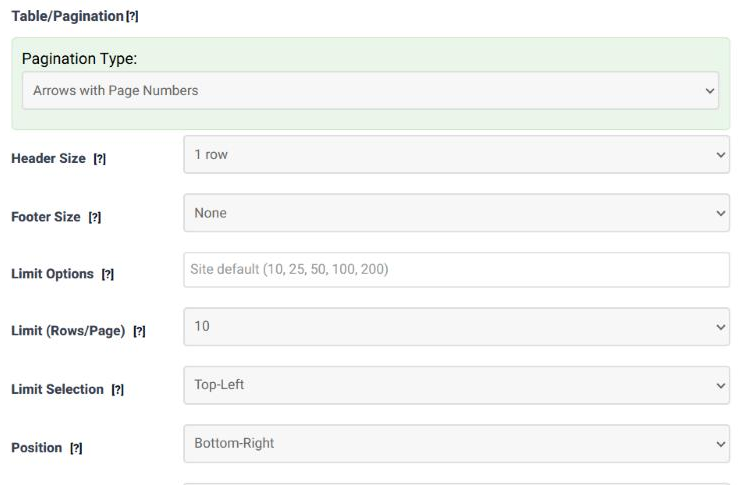
More about these settings: Table Pagination.
Open the data source in the Tabulizer back end (Data Sources), select the paginated ruleset and tick Server Side (beta).

The ruleset has to meet two conditions, and Tabulizer refuses to save the data source otherwise:
| Condition | Why |
|---|---|
| It has a pagination rule | Without pages there is no "current page of rows" to ask for. |
| It has no table split rule | A split needs the whole table at once. |
On the same form, set Cache Status to On and give a Cache Time in minutes. Server Side requires it, because the pages are served from the cached rows.
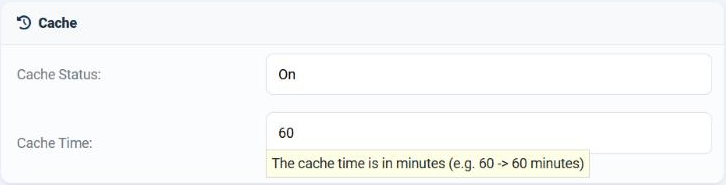
Choose the time according to how often the data changes: an hour or a day for a spreadsheet that is updated now and then, a few minutes for data that moves often. After replacing the source file, select the data source and press Clear Cache so the new rows are read.
The Tabulizer Status page shows your server's PHP Memory Limit and PHP Max Execution Time.
| Setting | What to do |
|---|---|
memory_limit |
Allow PHP at least 768M for very large tables. Your hosting control panel usually has the setting; otherwise ask your host. |
max_execution_time |
Increase it if reading the data is cut off before it finishes, for example to 120 or 300 seconds. |
Reading an Excel file is the expensive case. Save the sheet as a CSV file (File › Save As in Excel) and use a CSV data source instead: it needs considerably less memory. A CSV file holds values only, so colours, fonts and merged cells of the sheet do not come across - the ruleset provides the design.
Pagination alone only changes what is shown; every row is still sent to the browser. Add Server Side and the cache.
Check the ruleset selected in the form: it needs pagination and must not split the table. The cache also has to be On.
You are seeing the cached rows. Press Clear Cache for the data source.
PHP most likely ran out of memory or time. Raise the limits above, and set the Error Reporting of your site to show errors for a moment to confirm it.
No. For a few hundred rows the ordinary way is simpler and quick enough. Build the table first without Server Side, check that it is right, then turn it on.
Send us the page address, the number of rows and columns and your PHP limits through the Help Desk.
Back to Troubleshooting